An AI voice assistant for Windows. AivisSpeech / VOICEVOX for any voice.
Gemini Live for real-time dialogue. Screen Vision lets AI understand your screen.
7 AI providers, and offline use with local AI. 100% free software.
Mira helps with your PC work by voice, with 4 powers: Ears, Brain, Eyes, and Hands.
Custom wake word — call Mira any name. High-accuracy Whisper STT. AivisSpeech / VOICEVOX for your favorite character voice. Emotion TTS + 4-tier fallback.
※Speech recognition runs on your PC. With a local LLM + local TTS (AivisSpeech etc.), Mira also works offline (the speech model is downloaded once on first use)
7+ AI providers supported. Use Ollama for local LLMs — zero API cost, and conversations work without internet. Remembers conversations and understands context.
AI sees and analyzes your screen. Just say "Look at the screen" or "What is this error?" and AI explains what's displayed. Works with image-capable models from Gemini, Claude and OpenAI.
"Set volume to 50." "3 minute timer." Control with natural voice. Voice Launcher lets you register any app or site with custom keywords. Web Watch fetches your favorite sites on command.
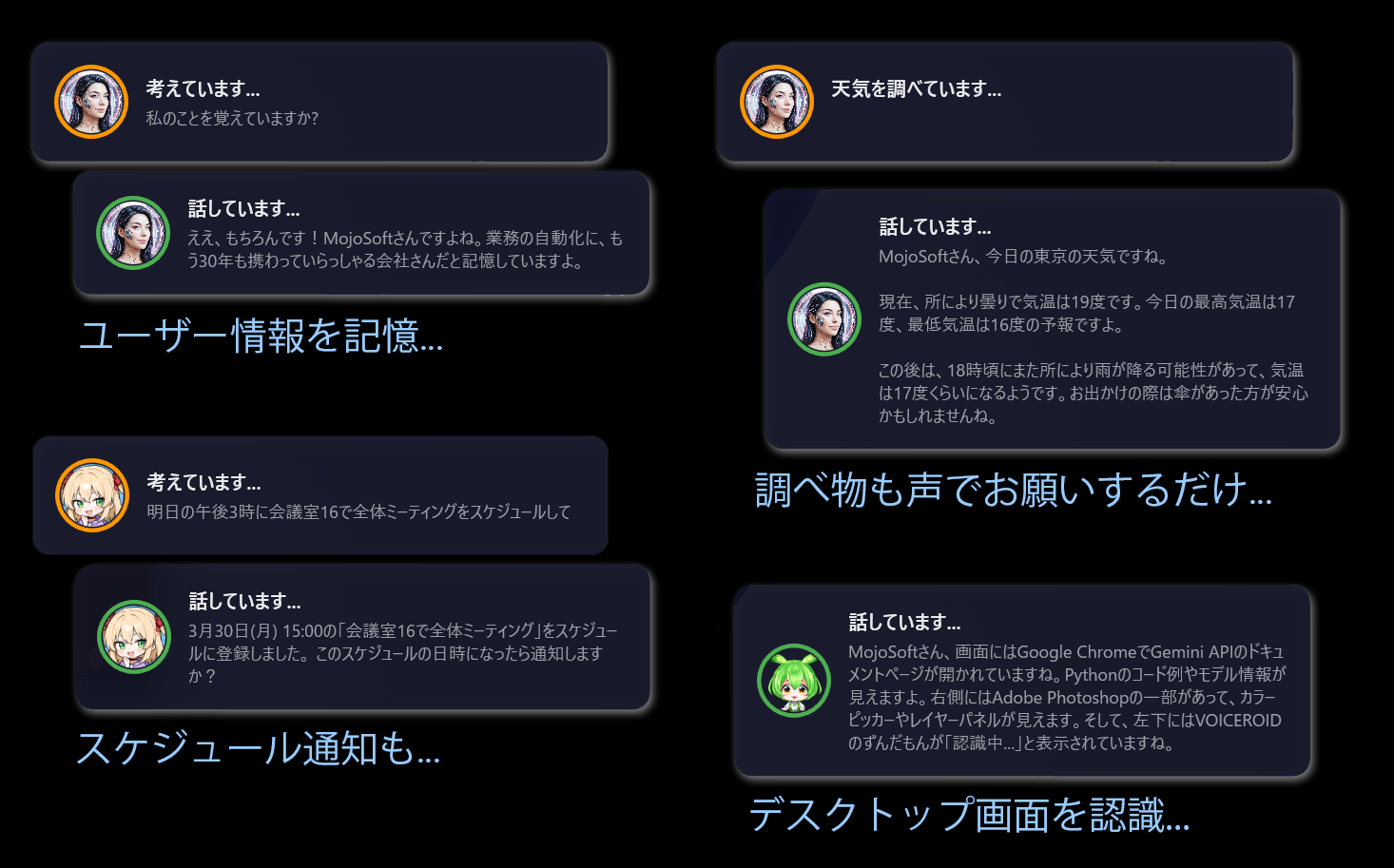
Memory, weather, scheduling, screen vision — all by voice.
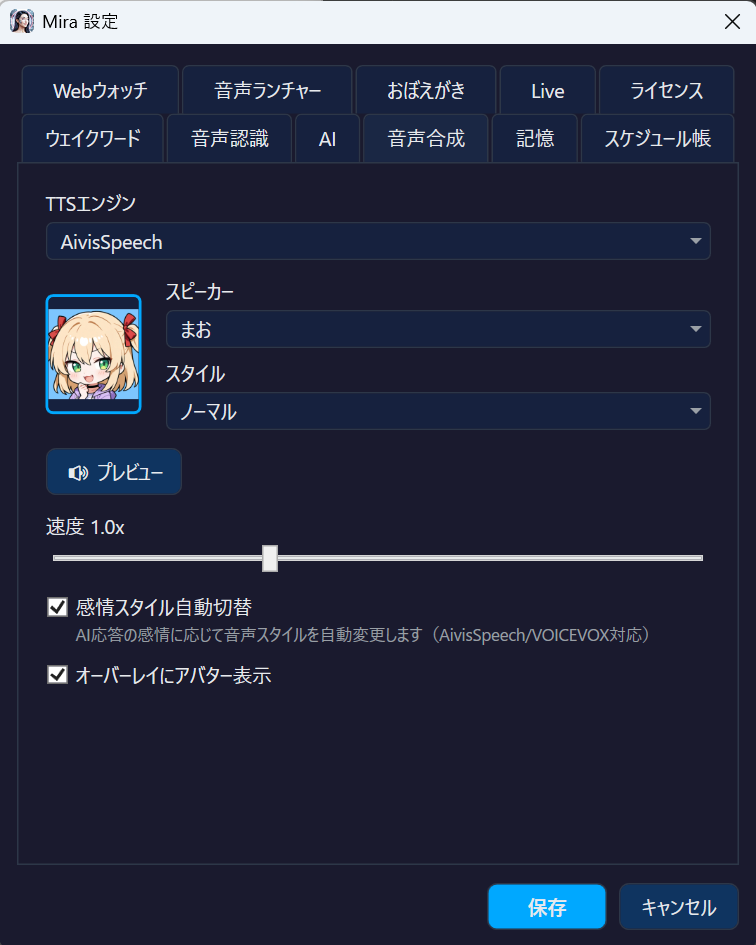
Mira supports AivisSpeech and VOICEVOX. Choose from 100+ character voices as Mira's voice. Emotion TTS auto-switches between 6 styles. 4-tier fallback ensures speech never stops.
4-tier fallback — uninterrupted speech
Gemini Live mode lets you converse with Mira in real-time, just like talking to a person. Your voice streams directly to the AI (Google) for natural, flowing conversation. Activated by the dedicated wake phrase "Mira Live", completely separate from normal wake word mode. Off by default — turn it on in Settings.
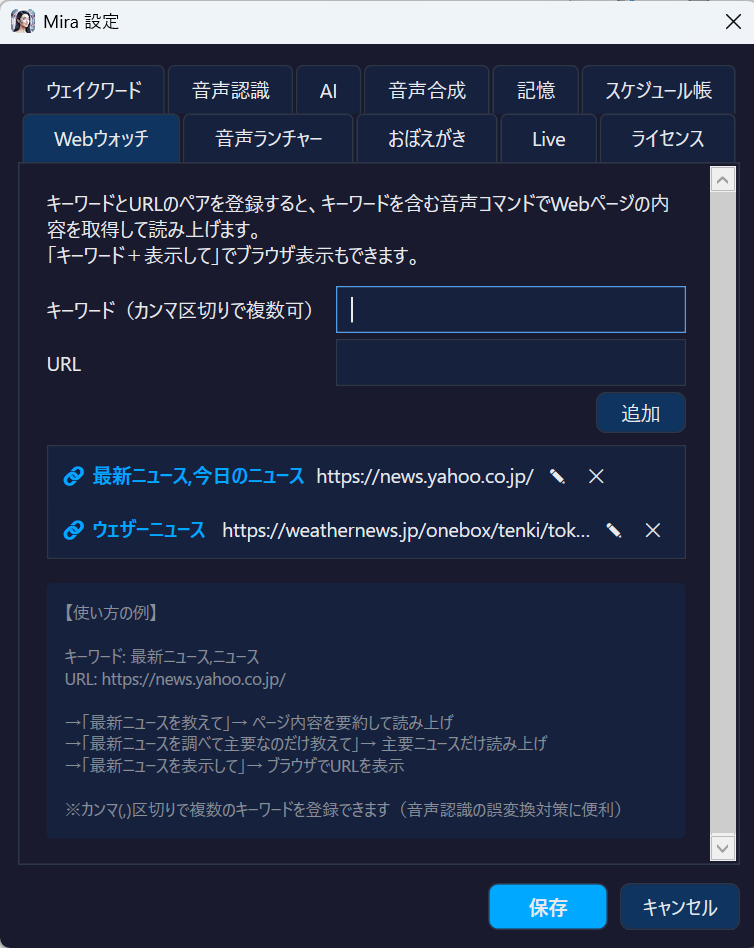
Register keyword + URL pairs. Say "Tell me the latest news" and Mira fetches the site, summarizes, and reads it aloud — no browser needed.
Add instructions like "just the highlights" or "everything" and AI adapts its summary on the fly. Say "show" to open in browser instead.
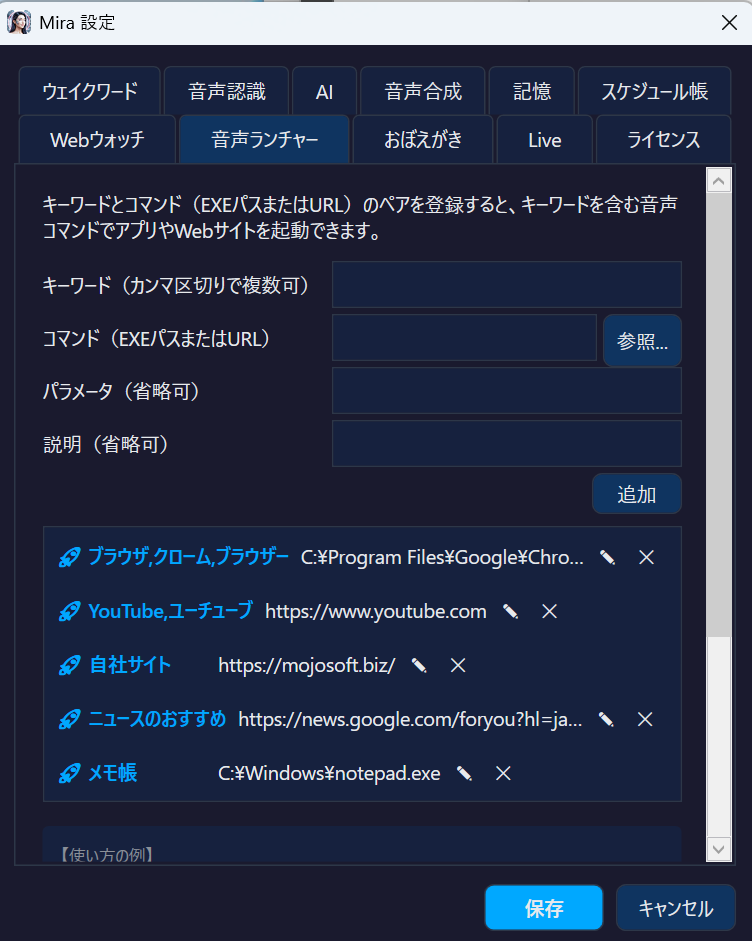
Register keyword + target pairs. Say "Open YouTube" or "Launch Notepad" and Mira opens the app or URL instantly — no mouse needed.
Registered keywords also boost STT recognition accuracy, prioritizing your frequently-used app names. Control your PC hands-free while working.
A transparent overlay in the bottom-right shows Mira's state in real-time. Watch AI think and speak.
"Hey Mira" to activate. Fully customizable.
→Whisper transcribes locally with high accuracy
→Local or cloud AI responds with streaming
→Speaks as AI generates.
→Runs searches, launches apps, sets alarms
Fully free locally. Maximum performance in the cloud. Choose either, or both.
BYOK (Bring Your Own Key) — Use your own API keys. No monthly fees, pay only for what you use. Ollama / LM Studio / Lemonade let you talk without internet, for free.
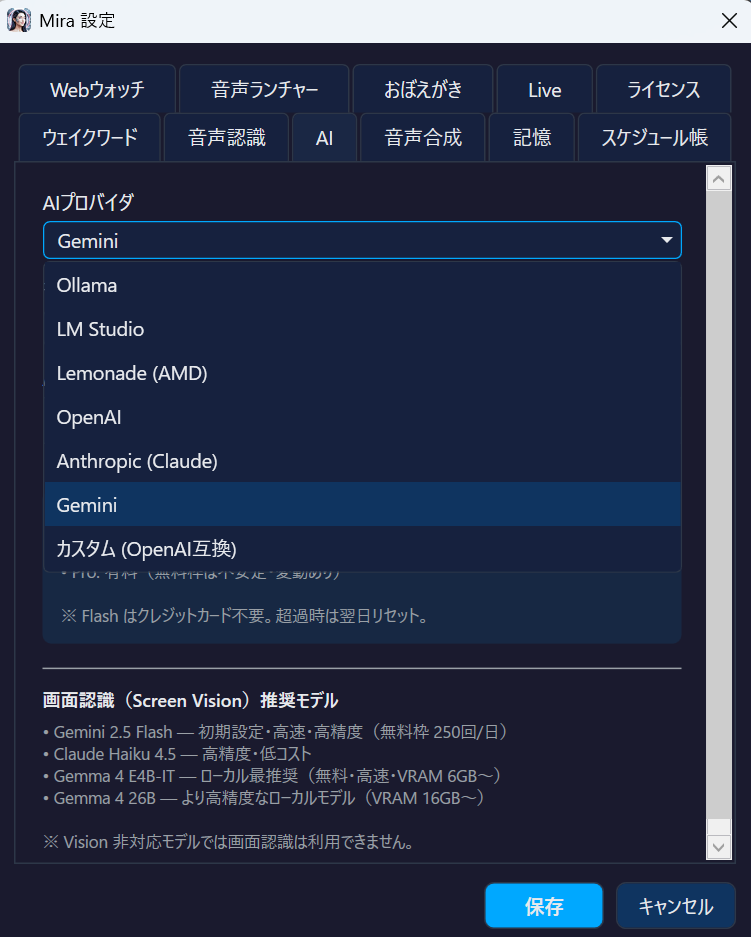
💡 One-click switching via dropdown in settings. Change providers mid-conversation freely.
Change the wake phrase to anything you like (by default, "Hey Mira" or "OK Mira").
Mira answers in the voice you choose from AivisSpeech or VOICEVOX (free, installed separately).
Use Gemini, OpenAI or Claude, or a local LLM (Ollama, LM Studio, Lemonade).
Change "Hey Mira" to any name
Speaks as AI generates
100+ character voices. Speak with your favorite
Choose local speech recognition, LLM and TTS to keep conversations on your PC
AI sees and understands your screen
Real-time voice dialogue
Remember important info with pin system
Fetch & summarize any site by keyword
Say "google …" to open Google results in your browser
Launch apps & sites with custom keywords
Set alarms and manage schedule by voice
Switch to your preferred theme
Mira is 100% free software. All features, no restrictions.
No subscription. No trial period.
Completely free · No feature limits
Wake word detection and speech recognition run on your PC. Mira only sends what the AI or service you choose needs.
| Feature | Where it runs | What is sent |
|---|---|---|
| Wake word detection | On your PC (Windows speech engine) | Nothing |
| Speech recognition | On your PC (Whisper) | Nothing (audio is discarded after transcription; the speech model is downloaded from Hugging Face on first use) |
| Conversation with AI | The AI you choose | Cloud AI (Gemini, OpenAI, Claude): your transcribed words, recent conversation, things Mira remembers, your Notes, your schedule and results such as web search results go to that provider. Local LLM (Ollama, LM Studio, Lemonade): nothing |
| Speech output | AivisSpeech, VOICEVOX and the Windows voice run on your PC. Edge TTS uses Microsoft | Only with Edge TTS: the text being spoken |
| Screen Vision (when you ask) | The cloud AI you use for conversation (Gemini, Claude, OpenAI). With a local LLM or another provider, Mira uses a saved Claude key, otherwise a saved Gemini key (with neither, Screen Vision is unavailable) | A screenshot of your entire main monitor |
| Live mode (off by default) | Google (Gemini Live) | Your microphone audio and results of tools the AI uses (such as clipboard text). Each time Live mode starts, what Mira remembers about you, your Notes and your upcoming schedule are also sent as instructions to the AI. With screen capture on, screenshots |
| Weather, web search, Web Watch | Each service | Place names (OpenStreetMap, Open-Meteo) and search terms (DuckDuckGo). Web Watch reads the sites you register and passes their text to the AI |
| Settings, API keys, memory and logs | On your PC (%LOCALAPPDATA%\Mira) | Nothing (API keys are encrypted by Windows. For when the conversation log and the diagnostic log (diag.log) are deleted, see the privacy policy) |
Mira has no telemetry and no automatic update check, and it never sends your conversations or personal information to Mojosoft (opening Settings or About connects to mojosoft.biz to show our other products). See the privacy policy for details.
Yes. There are no feature limits, trials or subscriptions. If you use a cloud AI, that provider may charge for API usage (Gemini, the default, has a free tier).
Cloud AI providers (Gemini, OpenAI, Claude) need your own API key. A Gemini key, the default, is free from Google AI Studio. Local LLMs (Ollama, LM Studio, Lemonade) need no key.
Yes. Choose a local LLM for AI and AivisSpeech, VOICEVOX or the Windows voice for speech, and everything from the wake word to the spoken reply stays on your PC. The speech recognition model must be downloaded once. Weather, web search, Screen Vision and Live mode use the internet. Note: if you have saved a cloud API key and your local AI is not running when Mira starts or when you save settings, Mira switches to the cloud AI. The same applies if an API key is set as an environment variable. Once switched, Mira stays on the cloud AI until you restart it or save settings.
In normal conversations, your voice is transcribed on your PC and then discarded. With a cloud AI, only the transcribed text is sent. Your microphone audio itself is sent only in Live mode (Google Gemini Live, off by default). Note that after each reply, Mira keeps listening for a while without the wake word so you can continue talking. Anything people nearby say during that time is also transcribed and, if you use a cloud AI, sent to that AI.
Mira cannot click or move windows. It can launch apps and websites, change the volume, read and write the clipboard, and handle alarms and schedules. In Live mode, the AI can also press keys and type text (you can turn this off in Settings). For hands-free control of all of Windows, Windows Voice Access is the better fit.
Voice Access is a built-in Windows feature for controlling the PC by voice: clicking, typing and navigating. Copilot is Microsoft's AI assistant. Mira is an app you call by name to talk with AI, check the weather, launch apps and set alarms, and you choose the AI (including local LLMs) and the voice it speaks with.
With AivisSpeech or VOICEVOX installed and running, Mira speaks in the character voice you choose. Otherwise it uses Edge TTS (Microsoft's online voices; requires Python edge-tts) or the built-in Windows voice.
The conversation log, the things Mira remembers and the diagnostic log (diag.log) are saved only on your PC (%LOCALAPPDATA%\Mira). Conversation logs older than 30 days are deleted the next time a conversation is logged. Your transcribed speech is also kept in the diagnostic log. The diagnostic log is not deleted by age: if it is over 1 MB when Mira starts, it is moved to diag.log.old and the one before it is deleted. You can review and delete remembered items in Settings. With the download version, this folder stays on your PC after you uninstall Mira. See the privacy policy for details.
Windows 10 (64-bit, version 2004 or later) and Windows 11. Download the installer from the download page on this site (the Microsoft Store version is available in Japan only).
Completely free. Download now.