The most powerful visual RPA tool ever built for macOS — now with Computer Use. AI Vision clicks, waits, reads, and validates your screen autonomously. Plus Apple Intelligence built in.

From simple mouse clicks to complex AI-driven workflows. RocketMouse AI gives you superpowers.
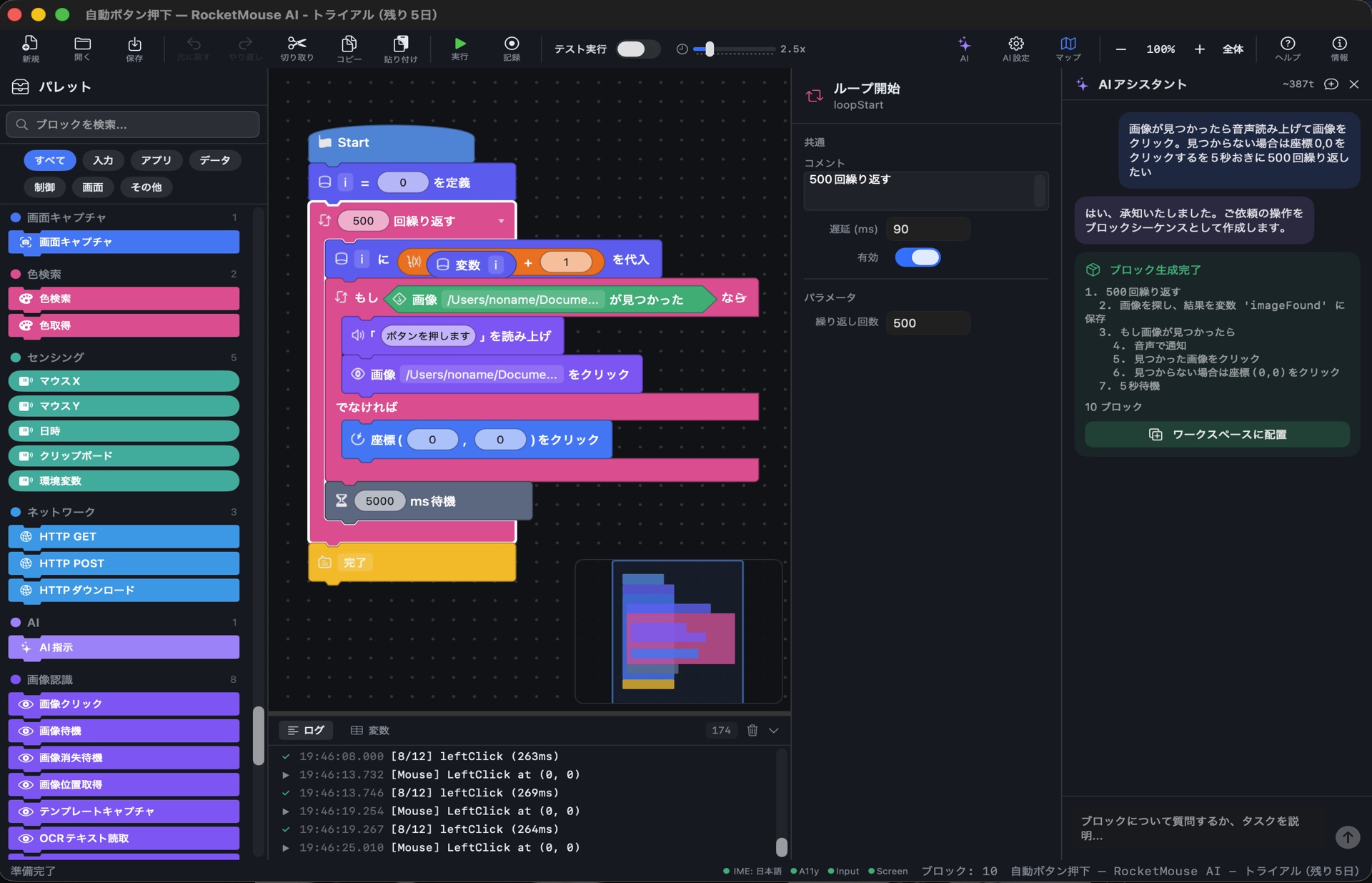
Build automation flows by snapping blocks together. 7 block shapes, color-coded categories, drag & drop, undo/redo, minimap navigation, and natural language display. No coding experience needed.
Describe what you want in plain English. AI generates the macro for you. Apple Intelligence is the default on macOS 26+ (free, on-device). Also supports OpenAI, Anthropic, Gemini, Groq, and Local LLM.
Playwright + Chrome built in. Navigate, click, fill forms, extract data, run scripts — all from visual blocks. Plus a visual element picker to select CSS/XPath selectors by clicking.
Read and write Excel files natively. 18 spreadsheet operations plus full file system access — copy, move, create, archive.
Apple Vision framework powers image recognition, template matching, and OCR text extraction. Find anything on screen.
Two powerful recording modes: Input Recording captures every mouse click and keystroke across any app, while Browser Recording auto-captures clicks, form fills, and page navigations in Chrome. Both generate editable blocks you can refine, loop, and extend.
.rmproj files are fully compatible between macOS and Windows. Build on Mac, run on Windows — and vice versa.
Each shape represents a different type of operation. Snap them together to build complex automations visually.
No selectors. No coordinates. Just describe what you see — AI Vision captures the screen, finds the element, and acts. The most natural way to automate any app.
"Click the Submit button" — AI captures your screen, finds the element using Vision LLM, and clicks it precisely. 2-pass refinement for pixel-perfect accuracy at screen edges.
"Wait until the loading spinner disappears" — AI polls the screen and understands when your condition is met. No fixed delays, no brittle selectors.
"Read the total price" — AI reads any text on screen and stores it in a variable. Works with any app, any language, any font.
"Is the confirmation dialog showing?" — AI checks the screen state and returns true/false. Perfect for conditional automation flows.
"Open System Preferences and enable Dark Mode" — AI takes full control. Dual-provider Computer Use: Anthropic (Claude Sonnet 4.6 / Opus 4.7) or OpenAI (GPT-5.5 / GPT-5.4 / computer-use-preview). Autonomous agent loop with click, type, scroll, and keyboard actions. Requires an Anthropic or OpenAI API key.
When image recognition or OCR fails, AI Vision automatically retries with natural language understanding. Your macros keep running even when the UI changes.
Routine operations use native macOS APIs — instant, reliable, and free. AI Vision handles only the parts that need visual understanding. The optimal balance of cost and reliability in a single macro — only with RocketMouse AI.
Traditional RPA is fast but brittle. Computer Use is flexible but slow and expensive. RocketMouse AI combines both — giving you speed, accuracy, stability, and cost efficiency.
| Traditional RPA | Computer Use Only | RocketMouse AI v2.0 | |
|---|---|---|---|
| Execution Speed | ✅ Very fast | ❌ Slow (LLM per step) | ✅ Fast — AI only when needed |
| Cost | ✅ Free / Low | ❌ High API costs | ✅ Low — Apple Intelligence free |
| UI Change Resilience | ❌ Breaks easily | ✅ Adapts naturally | ✅ Self-Healing fallback |
| Accuracy | ✅ Pixel-perfect | ⚠ Approximate | ✅ Pixel-perfect + 2-pass AI |
| Works with Any App | ⚠ Needs selectors | ✅ Any visual UI | ✅ Both approaches |
| Offline Capable | ✅ Fully offline | ❌ Requires cloud | ✅ Apple Intelligence offline |
| Stability | ✅ Deterministic | ❌ Non-deterministic | ✅ RPA-first, AI as safety net |
| Unexpected Dialogs | ❌ Stops execution | ✅ Handles autonomously | ✅ AI Autopilot handles it |
| Browser Automation | ⚠ Varies by tool | ⚠ Screen only (no DOM) | ✅ Playwright (DOM) + AI Vision |
| Setup Complexity | ⚠ Selectors, coords | ✅ Just describe | ✅ Record, describe, or build |
On macOS 26+, RocketMouse AI uses Apple Intelligence as the default AI provider for the built-in assistant. Completely free, fully private, no cloud required.
No API fees. No subscriptions. AI runs on your Apple Silicon chip.
Your data never leaves your Mac. On-device processing, always.
No internet needed. AI assistant works anywhere — even on a plane.
Describe what you want in plain language. AI generates the macro, explains it, and debugs it for you.
Tell the AI what you want to automate. It generates a complete macro with proper blocks, loops, and error handling — ready to run.
When something goes wrong, AI analyzes your macro's state, identifies the root cause, and suggests fixes automatically.
After recording desktop clicks, AI analyzes each click position and suggests converting them to AI Click blocks — making your macros resilient to UI changes.
From mouse clicks to AI instructions, every automation primitive you need is built in.
+ 8 more categories including Text, Reporters, Sensing, Color, Audio, Boolean, Screen Capture, and Remote
Choose your style. All three produce the same editable block macros.
Pick blocks from the palette and snap them together. Visual, intuitive, precise.
Click Record and perform your task manually. RocketMouse captures every action as blocks.
Describe your workflow in plain English. AI Assistant generates the macro instantly.
Run macros at 0.1x to 5.0x speed. Slow down to debug, speed up for production.
Test logic without executing real actions. Perfect for validating complex flows.
Set breakpoints, step through blocks one by one, inspect variables in real time.
Try-Catch blocks, custom functions with return values, and call stack depth up to 100.
Download RocketMouse AI free for 15 days. No credit card required.