Cortana の後継、ここに。 The successor to Cortana is here.
Mira AI Voice Assistant

声で、操る。 Control with your voice.

7つのAI。完全オフライン対応。AivisSpeech / VOICEVOX で好きな声。
Gemini Live でリアルタイム対話。Screen Vision で画面をAIが理解。
完全無料のフリーソフトです。
7 AI providers. Fully offline capable. AivisSpeech / VOICEVOX for any voice.
Gemini Live for real-time dialogue. Screen Vision lets AI understand your screen.
100% free software.

Microsoft Store Microsoft Store 無料ダウンロード Free Download 機能を見る → See Features →
Microsoft Store で公開中 — v2.0.0 無料 Now on Microsoft Store — v2.0.0 Free

4つの力 The 4 Powers

Mira は「耳」「脳」「目」「手」— 4つの力で、あなたの PC を完全にコントロールします。 Mira controls your PC with 4 powers: Ears, Brain, Eyes, and Hands.

👂 声 — Voice👂 Voice

聞く力 + 話す力Ears + Mouth

好きな名前で呼べるカスタムウェイクワード。Whisper で高精度な音声認識。AivisSpeech / VOICEVOX で好きなキャラクターの声に。感情TTS + 4段フォールバック。
※音声認識(STT)は完全ローカル処理。ローカルLLM + ローカルTTS(AivisSpeech等)で完全オフライン運用可能
Custom wake word — call Mira any name. High-accuracy Whisper STT. AivisSpeech / VOICEVOX for your favorite character voice. Emotion TTS + 4-tier fallback.
※Speech recognition runs entirely on your PC. With local LLM + local TTS (AivisSpeech), fully offline operation is possible

  • AivisSpeech / VOICEVOX 対応AivisSpeech / VOICEVOX Support
  • Whisper STT (ローカル)Whisper STT (Local)
  • ストリーミング TTS (500ms)Streaming TTS (500ms)
  • 感情 TTS (6スタイル自動切替)Emotion TTS (6 Styles, Auto)

🧠 脳 — Brain🧠 Brain

考える力Intelligence

7つ以上のAIプロバイダに対応。Ollama でローカル LLM を使えば、API 料金ゼロ・完全オフラインで動作。会話を記憶し、文脈を理解します。7+ AI providers supported. Use Ollama for local LLMs — zero API cost, fully offline. Remembers conversations and understands context.

  • Ollama / LM Studio / LemonadeOllama / LM Studio / Lemonade
  • Gemini / OpenAI / ClaudeGemini / OpenAI / Claude
  • 会話記憶 + ピン留めMemory + Pin System
  • ストリーミング応答Streaming Responses

👁 目 — Eyes👁 Eyes

見る力Vision

画面をAIが認識・分析。「画面を見て」「このエラー何?」と聞くだけで、表示内容をAIが解説。全 Vision 対応モデルで利用可能。AI sees and analyzes your screen. Just say "Look at the screen" or "What's this error?" and AI explains what's displayed. Works with all Vision-capable models.

  • AI Screen VisionAI Screen Vision
  • マルチプロバイダ対応Multi-Provider Support
  • Gemini / Claude / OllamaGemini / Claude / Ollama

🖐 手 — Hands🖐 Hands

操作する力Voice Control

「音量を50にして」「3分タイマー」— 自然な言葉で操作。音声ランチャーで好きなアプリやサイトをキーワード登録、Webウォッチでお気に入りサイトの最新情報を声で取得。"Set volume to 50." "3 minute timer." Control with natural voice. Voice Launcher lets you register any app or site with custom keywords. Web Watch fetches your favorite sites on command.

  • 音声ランチャー / WebウォッチVoice Launcher / Web Watch
  • Web検索 / 天気Web Search / Weather
  • アラーム / スケジュールAlarms / Scheduling
  • Gemini Live リアルタイムGemini Live Real-time

Mira との日常 Mira in Action

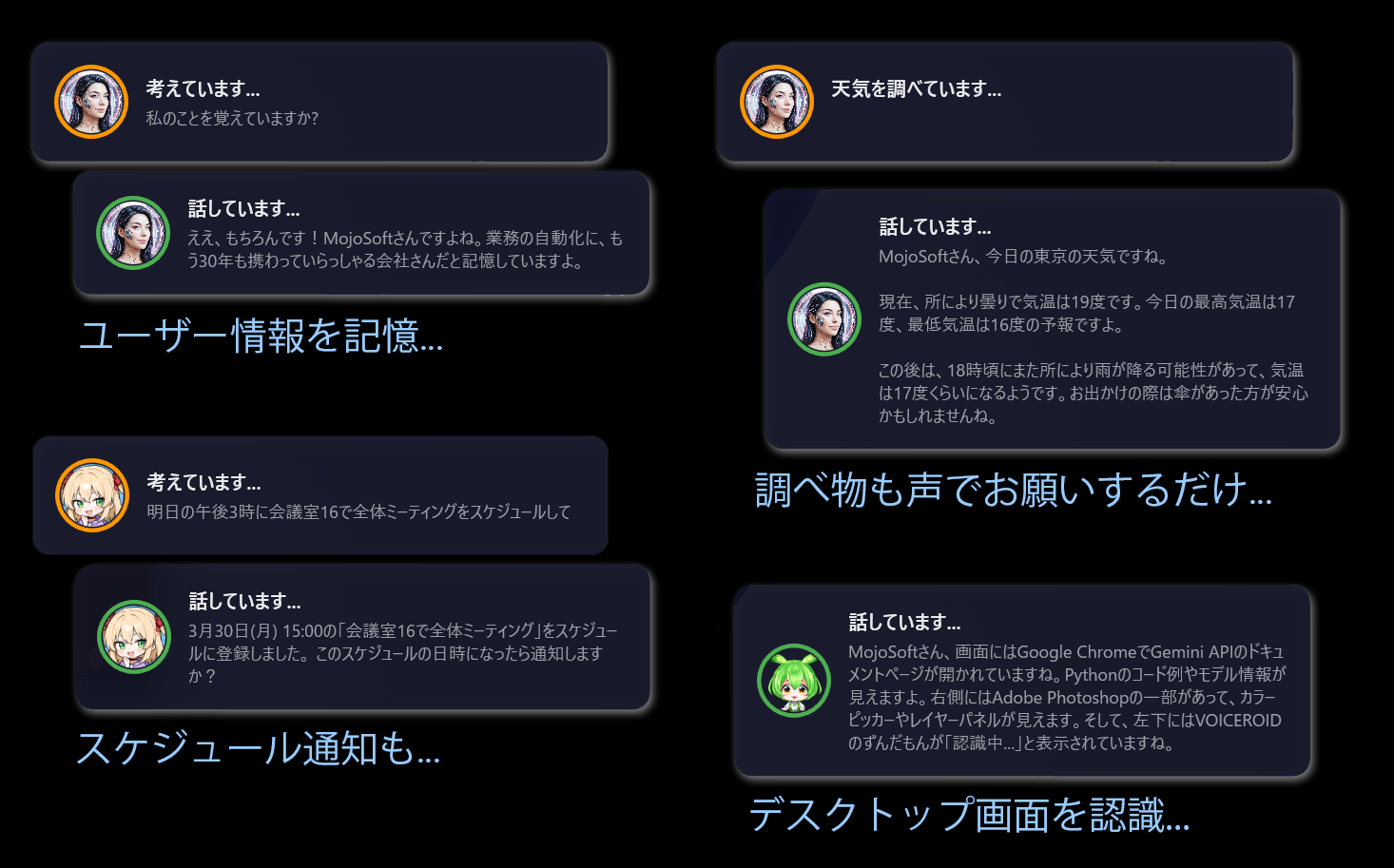
記憶・天気・スケジュール・画面認識 — すべて声だけで。 Memory, weather, scheduling, screen vision — all by voice.

Mira voice assistant conversation examples

AivisSpeech / VOICEVOX
対応。好きなキャラクターの声で。
AivisSpeech & VOICEVOX
support. Your favorite voice.

Mira は AivisSpeechVOICEVOX に対応。100を超えるキャラクター音声の中から、好きな声を Mira の声に設定できます。感情TTS で6つのスタイルを自動切替。さらに 4段フォールバック で途切れることなく話し続けます。 Mira supports AivisSpeech and VOICEVOX. Choose from 100+ character voices as Mira's voice. Emotion TTS auto-switches between 6 styles. 4-tier fallback ensures speech never stops.

  • AivisSpeech — 高品質日本語音声合成エンジン。豊かな表現力AivisSpeech — High-quality Japanese speech synthesis with rich expression
  • VOICEVOX — 無料で使える人気のキャラクター音声エンジンVOICEVOX — Popular free character voice engine
  • 感情TTS — 嬉しい・悲しい・怒り等6スタイルをAIが自動選択Emotion TTS — AI auto-selects from 6 styles: happy, sad, angry, etc.
  • ストリーミング — AI回答を生成しながら同時に読み上げ。体感500msStreaming — Speaks as AI generates. 500ms perceived latency
Mira

音声エンジン設定Voice Engine Settings

4段フォールバック — 途切れない音声4-tier fallback — uninterrupted speech

🎭
AivisSpeech
高品質・感情表現対応High quality with emotion
FREE
🗣️
VOICEVOX
100+ キャラクター音声100+ character voices
FREE
🌐
クラウド TTSCloud TTS
OpenAI / Google 等OpenAI / Google etc.
CLOUD
💻
SAPI5
Windows 内蔵 — フォールバック用Windows built-in — fallback
BUILTIN
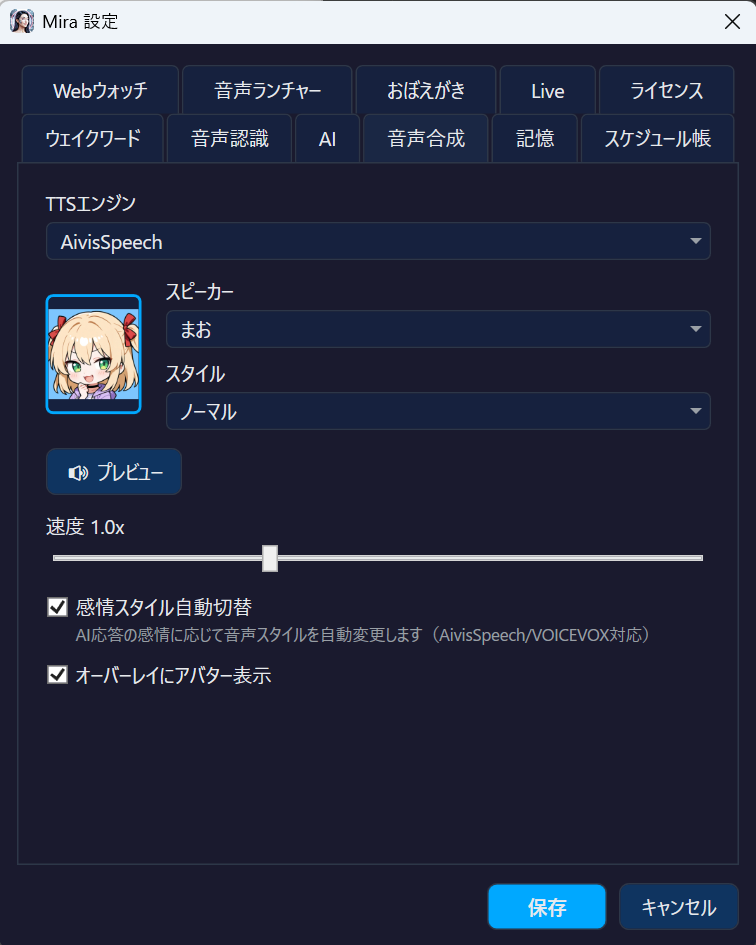
▼ 実際の設定画面 — 感情スタイル選択 ▼ Actual settings — Emotion style selection
Mira voice engine settings — AivisSpeech with emotion styles

「ミラライブ」で
リアルタイム会話が始まる。
Say "Mira Live" to start
real-time conversation.

Gemini Live モードでは、まるで人と話すように Mira とリアルタイムで対話できます。音声がストリーミングで直接AIに送信され、待ち時間なく自然な会話が成立。専用ウェイクフレーズ「ミラライブ」で即座に起動。通常モードの「ミラお願い」とは完全に分離されています。 Gemini Live mode lets you converse with Mira in real-time, just like talking to a person. Voice streams directly to AI with zero wait — natural, flowing conversation. Activated by the dedicated wake phrase "Mira Live", completely separate from normal wake word mode.

  • WebSocket リアルタイムストリーミング — 遅延ほぼゼロWebSocket real-time streaming — near-zero latency
  • Function Calling 対応 — 天気・検索・アラームを会話中に実行Function Calling — Weather, search, alarms during conversation
  • 画面キャプチャ — 今見ている画面について会話Screen capture — Talk about what's on your screen
  • 停止フレーズ で即終了 — いつでも安全に停止Stop phrase — Safely exit anytime
Gemini Live — リアルタイム接続中 Gemini Live — Connected in real-time
🎤 今開いてるこのスプレッドシート、何が書いてある? 🎤 What's in this spreadsheet I have open?
📊 画面を見ますね… 売上データの月次レポートです。3月は前月比 +12% で、特に広告収入が大きく伸びています。 📊 Let me look at the screen... It's a monthly sales report. March is up 12% month-over-month, with advertising revenue showing strong growth.
🎤 じゃあそのデータでグラフ作って 🎤 Create a chart from that data
📈 了解です。Excelでグラフを作成しますね… 棒グラフと折れ線グラフ、どちらがいいですか? 📈 Got it. Creating a chart in Excel... Would you prefer a bar chart or a line chart?

Webウォッチ Web Watch

キーワードURLをペアで登録するだけ。「最新ニュース教えて」と話しかければ、Mira が指定サイトにアクセスして内容を要約・読み上げ。ブラウザを開く必要すらありません。

「主要なニュースだけ教えて」「全部教えて」のように指示を追加するだけで、AIが読み上げ方を柔軟に調整。「表示して」と言えばブラウザで表示もOK。
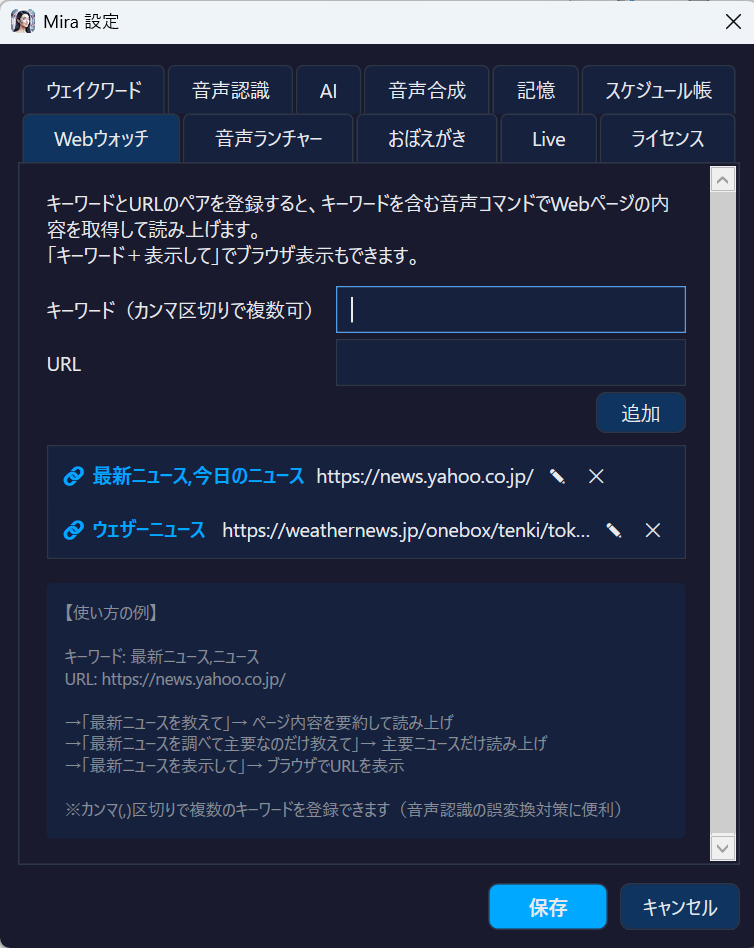
Register keyword + URL pairs. Say "Tell me the latest news" and Mira fetches the site, summarizes, and reads it aloud — no browser needed.

Add instructions like "just the highlights" or "everything" and AI adapts its summary on the fly. Say "show" to open in browser instead.

Mira Web Watch settings screen
音声コマンド例:Voice commands:
「最新ニュース教えて」→ 要約読み上げ
「最新ニュースの主要なのだけ」→ AI が絞る
「最新ニュース表示して」→ ブラウザで表示
"Tell me the latest news" → Summarize
"Just the headlines" → AI filters
"Show the latest news" → Open in browser

声だけでアプリ・URL起動 Launch apps & URLs by voice.

キーワード起動対象をペアで登録。「ユーチューブ開いて」「メモ帳起動して」と話しかければ、マウスに触れずに即座にアプリやWebページを開けます。

登録したキーワードは STTの認識精度も自動で向上。よく使うアプリ名を優先的に聞き取ってくれます。作業中の両手がふさがっていても、声だけで PC を操作。
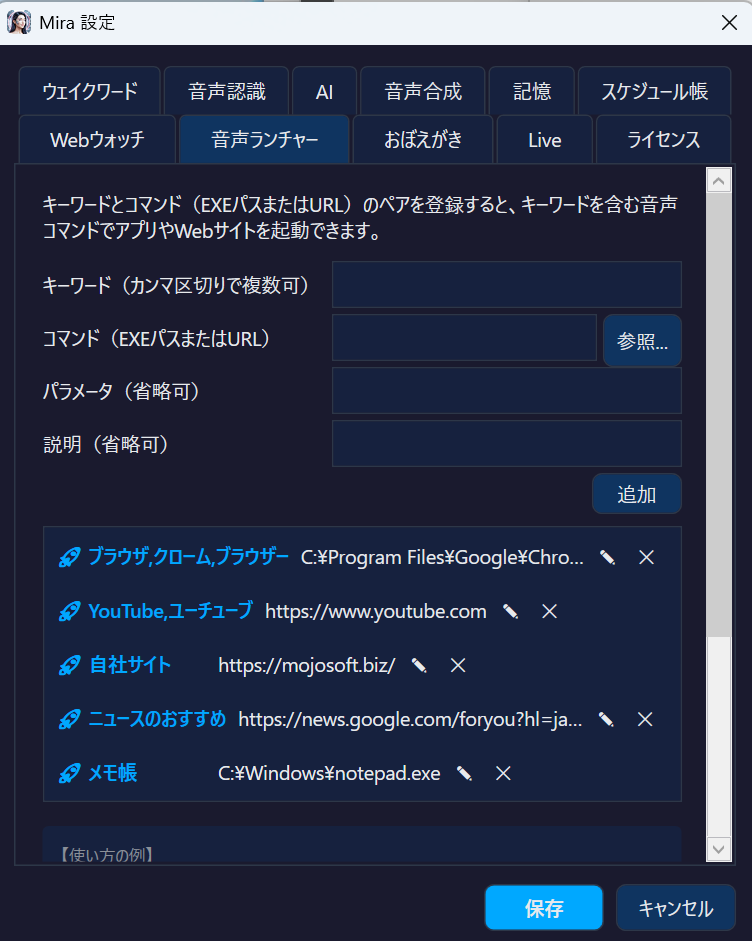
Register keyword + target pairs. Say "Open YouTube" or "Launch Notepad" and Mira opens the app or URL instantly — no mouse needed.

Registered keywords also boost STT recognition accuracy, prioritizing your frequently-used app names. Control your PC hands-free while working.

  • アプリ起動 — exe・UWP アプリ・ショートカット何でもLaunch apps — exe, UWP apps, shortcuts — anything
  • URL起動 — よく見るサイトを声で即表示Open URLs — Jump to any website by voice
  • STT連携 — 登録キーワードは認識精度が向上STT integration — Registered keywords gain recognition accuracy
  • 無制限登録 — 好きなだけショートカットを作成可能Unlimited entries — Create as many shortcuts as you want
Mira Voice Launcher settings screen
音声コマンド例:Voice commands:
「ユーチューブ開いて」→ YouTube をブラウザで表示
「メモ帳起動して」→ notepad.exe を起動
「ジーメール見せて」→ Gmail を即表示
"Open YouTube" → YouTube in browser
"Launch Notepad" → Starts notepad.exe
"Show Gmail" → Opens Gmail instantly

常にデスクトップに寄り添う Always by your side

画面右下の透過オーバーレイで、Mira の状態をリアルタイムに確認。AIが考え、話す過程が目に見えます。 A transparent overlay in the bottom-right shows Mira's state in real-time. Watch AI think and speak.

Mira
話しています... Speaking...
明日の天気は晴れで、最高気温は22度の予報です。お出かけ日和ですね! Tomorrow's forecast is sunny with a high of 72°F. Perfect for going out!
聞いてるListening
考え中Processing
話してるSpeaking

声から行動へ、500msで From voice to action in 500ms

1
🎤

ウェイクワードWake Word

「ミラお願い」で起動。好きな名前に変更可能"Hey Mira please" to activate. Fully customizable.

2
👂

音声認識Speech-to-Text

Whisper がローカルで高精度に文字起こしWhisper transcribes locally with high accuracy

3
🧠

AI処理AI Processing

ローカル or クラウド AI がストリーミング応答Local or cloud AI responds with streaming

4
🗣️

ストリーミングTTSStreaming TTS

生成と同時に読み上げ。体感500msSpeaks as AI generates. 500ms latency.

5

アクション実行Action

検索・起動・操作を自動実行Auto-execute search, launch, control

7つのAI。すべてあなたの選択。 7 AI providers. All your choice.

ローカルで完全無料。クラウドで最高性能。どちらでも、両方でも。 Fully free locally. Maximum performance in the cloud. Choose either, or both.

Ollama
LM Studio
Lemonade
OpenAI
Anthropic
Gemini
カスタムCustom

BYOK(Bring Your Own Key) — あなた自身のAPIキーで利用。月額課金なし、使った分だけ。ローカル動作の Ollama / LM Studio / Lemonade なら完全オフライン・完全無料で動作します。 BYOK (Bring Your Own Key) — Use your own API keys. No monthly fees, pay only for what you use. Ollama / LM Studio / Lemonade run fully offline, completely free.

💡 設定画面のドロップダウンでワンクリックで切替。会話の途中でも自由に変更可能。 💡 One-click switching via dropdown in settings. Change providers mid-conversation freely.
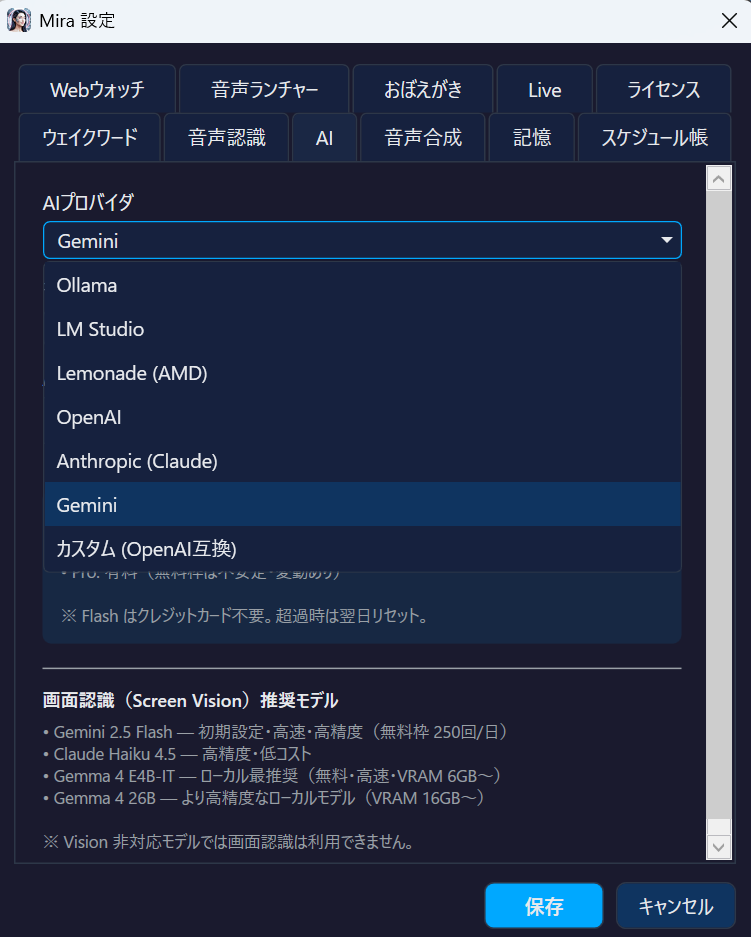
Mira AI provider selection screen — 7 providers

なぜ Mira なのか Why Mira?

機能Feature Cortana Braina Pro Mira
カスタムウェイクワードCustom Wake Word
オフライン AIOffline AI
AivisSpeech / VOICEVOXAivisSpeech / VOICEVOX
高品質日本語 TTSJapanese TTS (High Quality)
ストリーミング応答Streaming Response
Screen VisionScreen Vision
リアルタイム音声対話Real-time Voice Dialogue
価格Price 廃止Discontinued $79/年/yr 無料Free

これが Mira の全力 Everything Mira can do

🎙️

カスタムウェイクワードCustom Wake Word

「ミラお願い」を好きな名前に変更Change "Hey Mira please" to any name

🗣️

ストリーミング TTSStreaming TTS

AI生成と同時に読み上げ。体感500msSpeaks as AI generates. 500ms latency

🎭

AivisSpeech / VOICEVOXAivisSpeech / VOICEVOX

100+キャラクター音声。好きな声で話す100+ character voices. Speak with your favorite

🔒

完全オフライン対応Fully Offline Capable

ローカルSTT + ローカルLLM + ローカルTTSで完全にPC内で完結Local STT + Local LLM + Local TTS — everything stays on your PC

👁️

Screen VisionScreen Vision

AIが画面を見て状況を理解AI sees and understands your screen

🎙️

Gemini LiveGemini Live

リアルタイム音声対話。待ち時間ゼロReal-time voice dialogue. Zero wait time

🧠

会話記憶Conversation Memory

重要な情報を記憶・ピン留め保存Remember important info with pin system

🌐

Webウォッチ NEWWeb Watch NEW

キーワードで指定サイトの内容を要約・読み上げFetch & summarize any site by keyword

🔍

Web 検索Web Search

音声で検索、結果を読み上げSearch by voice, results read aloud

📱

音声ランチャーVoice Launcher

キーワード登録でアプリ・サイトを起動Launch apps & sites with custom keywords

アラーム / スケジュールAlarms / Schedule

音声でアラーム設定・予定管理Set alarms and manage schedule by voice

🌙

ダーク / ライトテーマDark / Light Theme

お好みのテーマに切替Switch to your preferred theme

完全無料。ずっと使える。 Completely free. Forever.

Mira は無料のフリーソフトです。全機能を制限なくお使いいただけます。
サブスクリプションも試用期間もありません。
Mira is 100% free software. All features, no restrictions.
No subscription. No trial period.

フリーソフト Free Software
¥0 $0

完全無料 · 機能制限なし Completely free · No feature limits

  • 全機能利用可能All features included
  • 試用期間なし(永続無料)No trial period (free forever)
  • 無料アップデートFree updates
  • ライセンスキー不要No license key required
無料ダウンロード Free Download

Mira に会いませんか? Ready to meet Mira?

完全無料。今すぐダウンロード。 Completely free. Download now.

ダウンロード Download ヘルプを見る View Help